Hello.
This is Team Everywhere, supporting the growth of manufacturing.
Have you ever thought that you had corrected master data, only to find that the old value remained on another screen?
Have you ever registered a sales order but could not see the total cost at a glance, or found the customer and person-in-charge fields empty,
causing registration to be blocked?
Rather than highlighting new features, this update addresses inconsistent master data, costs that were not visible, and blocked registration
by correcting these bugs one by one.
|
|

|
This Update Key Summary
|
|
|
1. BOM→BOP Consistency
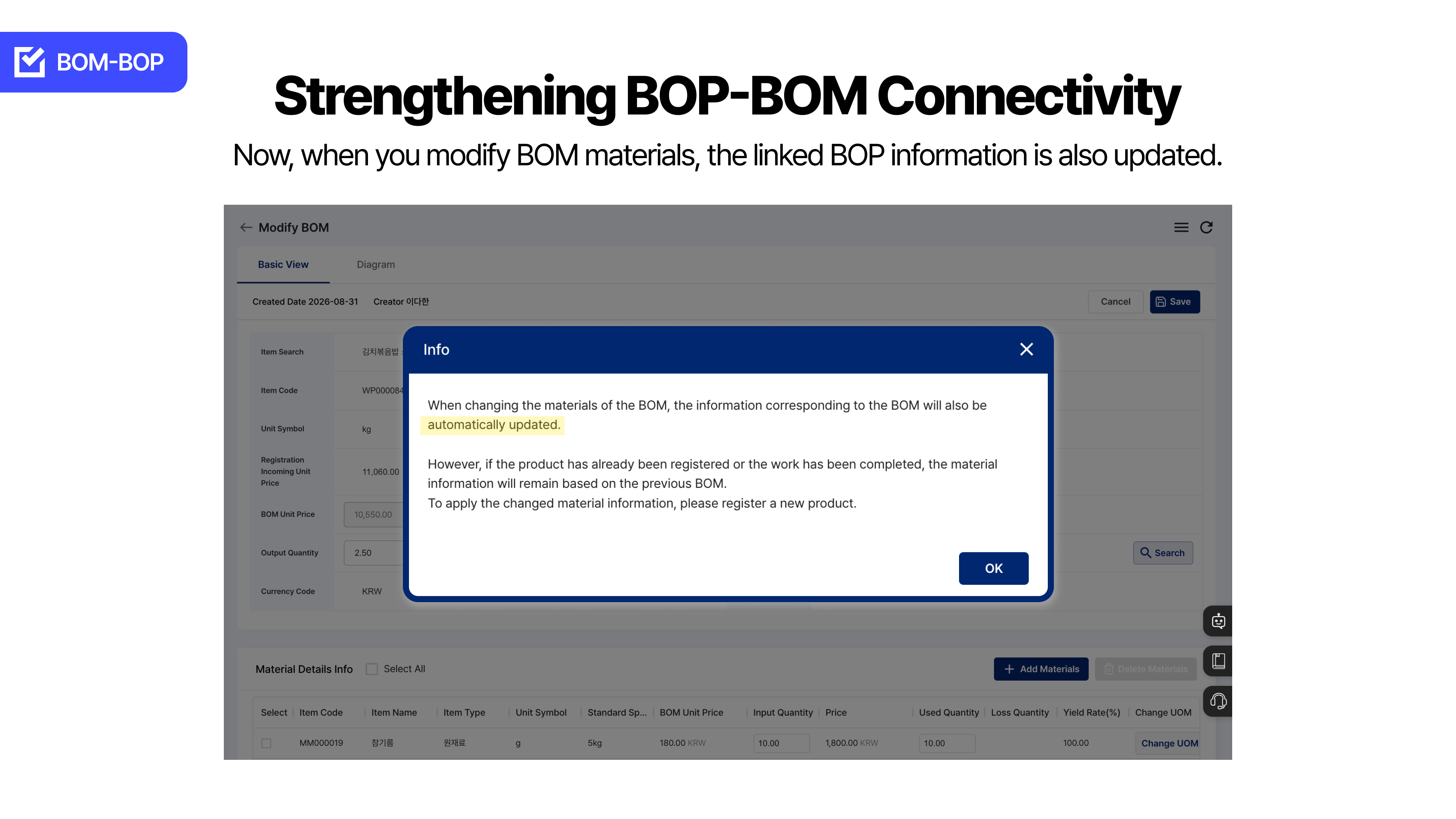
When BOM material data is corrected, the connected BOP information and issue location are updated together, and you can confirm this in a notification modal.
|
|
|
2. Sales Order Cost and Material Cost Display
When registering through AI purchase order recognition, the total cost is shown immediately, and material costs in sales order registration and details are displayed with thousands separators and two decimal places.
|
|
|
3. Optional Customer and Person in Charge
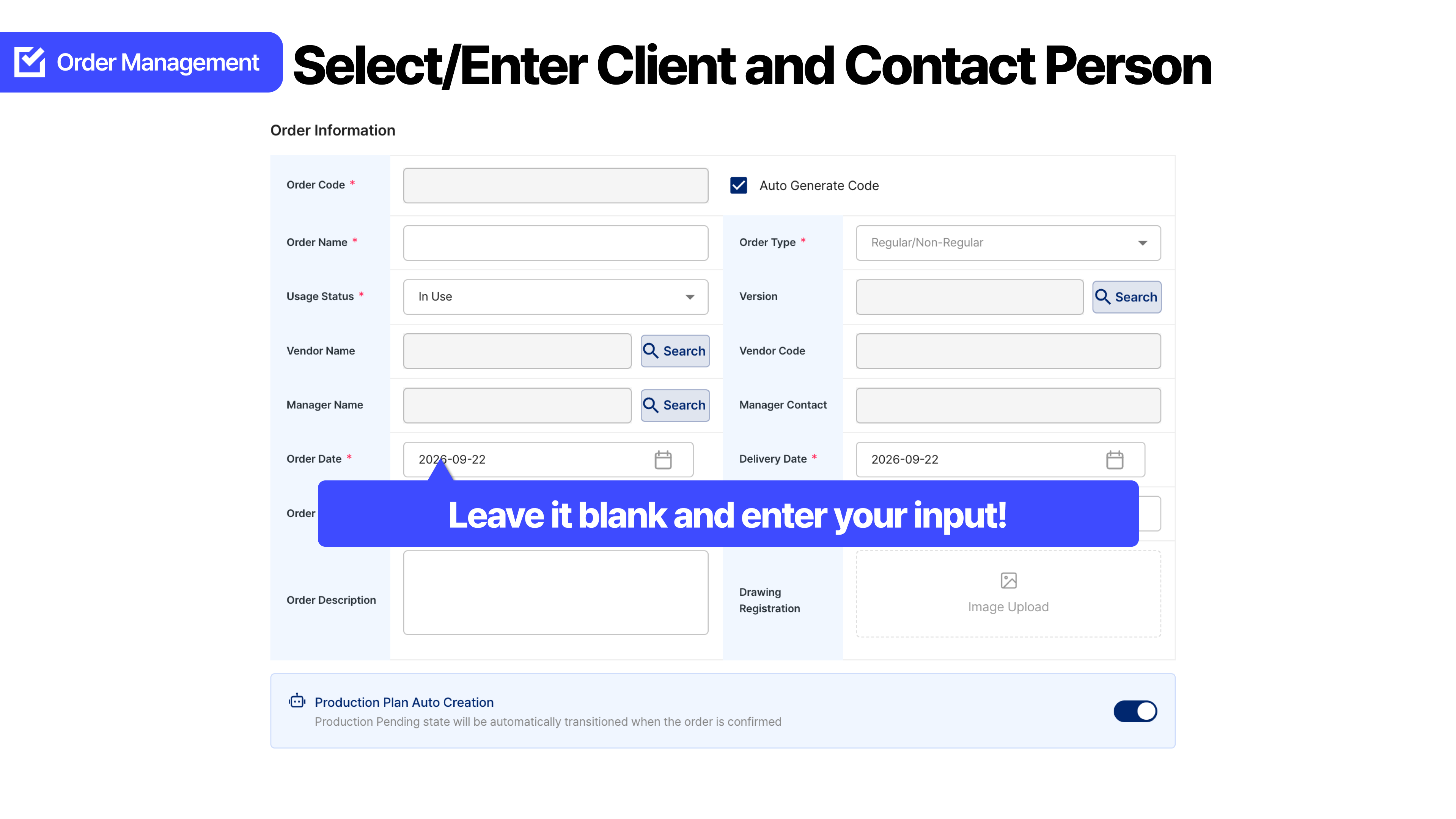
In Sales Order Management > New Registration, the customer and person in charge can be optional rather than required.
|
|
1
When the BOM is corrected, the connected BOP is also corrected
|
|
: BOM–BOP consistency
❌ Before
Even after the material information in the BOM had been corrected, the connected BOP or issue location could
still retain the previous data.
If the process and material issue proceeded with inconsistent master data, it could lead to loss, rework, and delivery schedule disruption,
increasing the burden of double-checking and concern about omissions.
✅ After
Now, when BOM material data is modified, the connected BOP information is updated together,
and the related issue location follows the change.
After checking what will change together in the notification modal, you can continue to the next task.
|
✅ At a Glance
Before — Only the BOM was modified, while the connected BOP and issue location could retain old values
After — Modify BOM material → update connected BOP and issue location together + notification modal
Reference (BOP feature group; not a direct measurement of this fix) — process calculation and inventory checking: 40 min→5 min (about 90% reduction)
|
|
|
2
The total is visible, and the material cost figures are readable
|
|
: Total sales order cost · Material cost display
❌ Before
Even after registering a sales order, to understand the total cost,
each item’s material cost had to be opened and added together.
If digit grouping and decimal notation were hard to read, comparing and reporting amounts
required another pause for verification.
✅ After
When registering through AI purchase order recognition in Sales Order Management > New Registration,
the total cost is displayed immediately without opening each item’s material cost individually.
Material costs in sales order registration and sales order details are shown with thousands separators (,) and two decimal places.
|
✅ At a Glance
Before — Open each item’s material cost and add them / material cost digits were difficult to read
After — Display total cost immediately + display material cost with thousands separators (,) and two decimal places
|
|
|
3
Sales order registration is less likely to be blocked even when information is missing
|
|
: Optional customer and person in charge
❌ Before
There are also urgent sales orders for which the customer or person in charge has not yet been determined.
If a required field was empty, registration itself stopped,
leaving work blocked by information that could be entered later.
✅ After
Now, you can register a sales order with the customer and person in charge set as optional fields.
However, even though they are optional, we recommend filling them in when possible and, if left empty at registration,
supplementing them afterward.
|
✅ At a Glance
Before — Customer and person in charge required → registration blocked when fields are empty
After — Registration possible with optional input + fill in when possible
|
|
|
+
Additional Update
|
🖼 Side Menu Icon Loading
We improved the loading method so that the Master Data Management and Factory Management SVG icons are displayed faster.
|
|
Frequently Asked Questions
|

|
When BOM material data is corrected, is the process information also updated?
|
|
|
A. When BOM material data is modified, the connected BOP information is updated together, and the related issue location is also corrected. You can confirm this in the notification modal.
|
|
|
|
When is the total sales order cost displayed immediately?
|
|
|
A. When registering through AI purchase order recognition in Sales Order Management > New Registration, the total cost is displayed immediately without opening each item’s material cost individually.
|
|
|
|
How are material costs displayed on the sales order screen?
|
|
|
A. In sales order registration and sales order details, material costs are displayed with thousands separators (,) and two decimal places.
|
|
|
|
Can a sales order be registered without a customer or person in charge?
|
|
|
A. In Sales Order Management > New Registration, the customer and person in charge are optional. You can register with them empty, but we recommend filling them in when possible or supplementing them afterward.
|
|
|
|
Are the figures in this article direct measurements of this fix?
|
|
|
A. The BOP feature-group figures in this article (such as 40 min→5 min) are from the product introduction and are not direct measurements of this BOM–BOP integration fix.
|
|
Smart manufacturing management,
Start with ORCA
|
|
|
| 01 |
| Free Data Migration |
|
ORCA organizes and migrates your Excel files and handwritten ledgers free of charge.
|
|
|
|
| 02 |
| KRW 9,900 per person/month |
|
Start your smart factory at a reasonable cost with no implementation fee.
|
|
|
|
|
|
Go to the ORCA Landing Page
|
|



