Dashboard
The Dashboard is a summary screen that brings together key production and inventory indicators in one place. You can check material in/out, work schedules, inventory costs, and delivery and production statistics at a glance without opening each screen.
Screen layout
When you open the screen, data is loaded automatically without any input or search. Your company name is shown in the title, and the period each area uses, such as Weekly or Monthly, is shown next to the area's title.
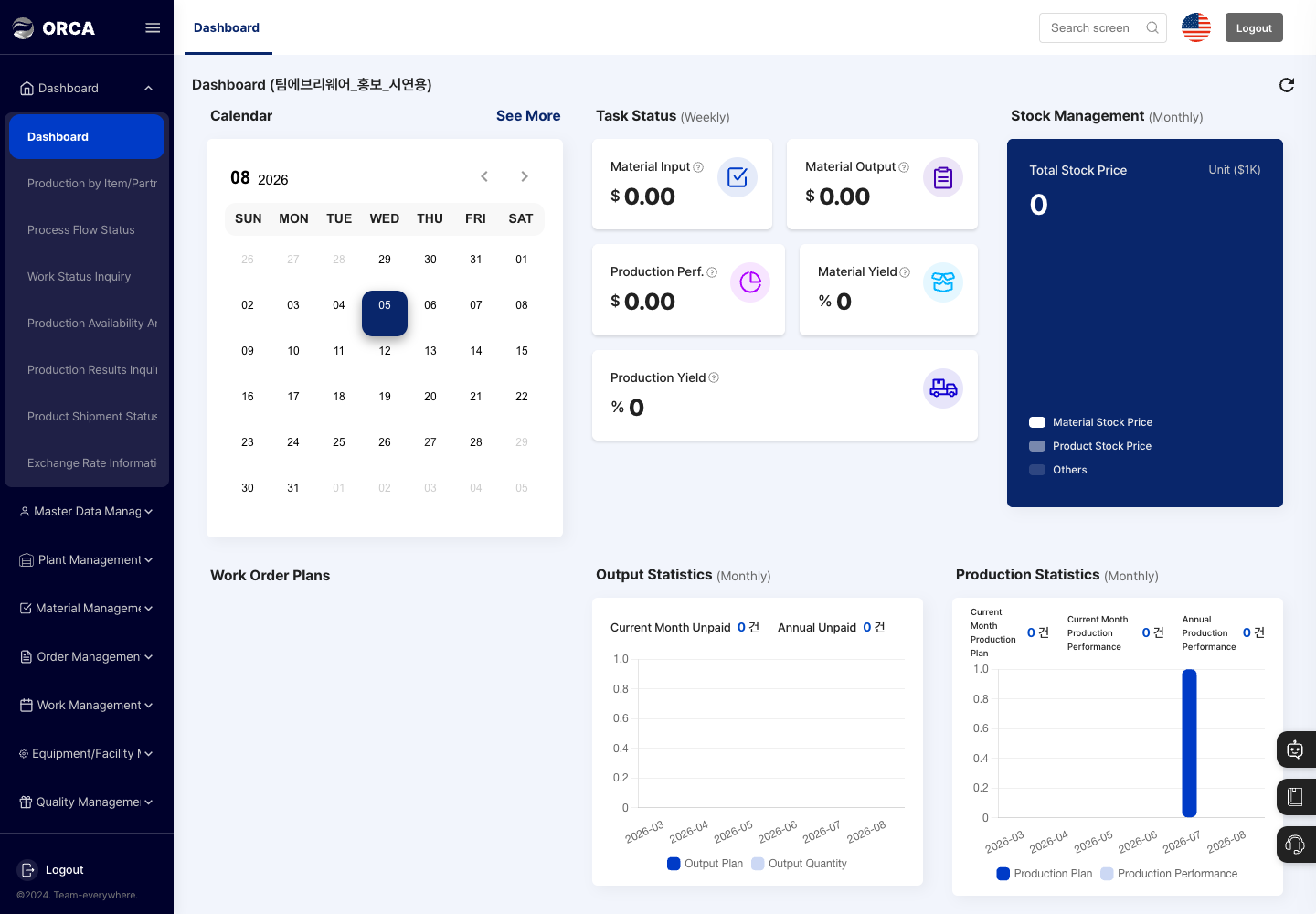
- Performance Ranking: Ranks workers by production performance from the first day of this month through today. It appears only when there is ranking data.
- Calendar: A monthly calendar. A colored dot marks each date on which a production plan starts. Click a dot to open the
Schedule Listfor that day, and click an item in the list to open the details of that production plan in a new tab. Click See More on the right to open the Work Status Inquiry screen in a new tab. - Task Status (Weekly): Shows this week's figures in the
Material Input,Material Output,Production Perf.(amount),Material Yield, andProduction Yield(%) cards. Hover over a card to see a description of each figure. - Stock Management (Monthly): Shows the
Total Stock Price(in thousands) split into material stock price, product stock price, and others. - Work Order Plans: Shows each work order's name, work order date, and progress status (
Before Production,In Production,Completed Production) as cards. - Output Statistics (Monthly): Shows
Current Month UnpaidandAnnual Unpaidcounts, plus a monthly chart of output plan and output quantity. - Production Statistics (Monthly): Shows
Current Month Production Plan,Current Month Production Performance, andAnnual Production Performance, plus a monthly chart of production plan and production performance. - Click the refresh button at the top right to reload the latest data.
Check the status
- In the left menu, click Dashboard → Dashboard.
- Review the indicators shown as cards, charts, schedules, and rankings.
- To see the production plans for a date, click a colored dot on the Calendar.
- To see work schedules in more detail, click See More to the right of the Calendar to open Work Status Inquiry.
When the payment delay banner appears
If your company's payment confirmation is delayed, the Payment confirmation is delayed. banner and the Payment confirmation delay expiration date appear at the top of the Dashboard.
- Check the
Payment confirmation delay expiration dateshown in the banner. - Before that date, ask your company administrator to check the payment status.
- You can close the banner with the close (X) button at its top right. When you open the screen again, it appears again depending on the payment status.
FAQ
Q. All the numbers show 0. The Dashboard automatically collects and shows registered operational data. Check on each screen whether there are material in/out, work completion, shipment, and inventory records for that period.
Q. The numbers are different from what I expected. Check the material in/out, work completion, shipment, and inventory records for that period on their original screens, then open the Dashboard again.
Q. Can I change the period myself? No. The Dashboard has no period selection, and each indicator uses its own fixed period automatically. To view a specific period, use Production Results Inquiry or Production by Item/Partner.
Q. I closed the payment delay banner, but it appears again. This is normal. If payment confirmation is not complete, the banner appears again when you open the screen again.
Related menus
- Work Status Inquiry — See work schedules in detail in a calendar and Gantt chart.
- Production Results Inquiry — View production results recorded through work completion by period.
- Product Shipment Status — Check the progress of shipments.
- Production Plan Management — Register and manage the production plans shown on the calendar.
- Production Availability Analysis — Check how much you can produce with current stock and which materials are short.