Production Results Inquiry
This screen gathers production results processed through work completion. For each production, you can compare the planned quantity, actual production quantity, loss quantity, yield, and required time in one list, and expand it to see results by process.
Screen layout
When you first open the screen, all results are loaded without a search term or period.
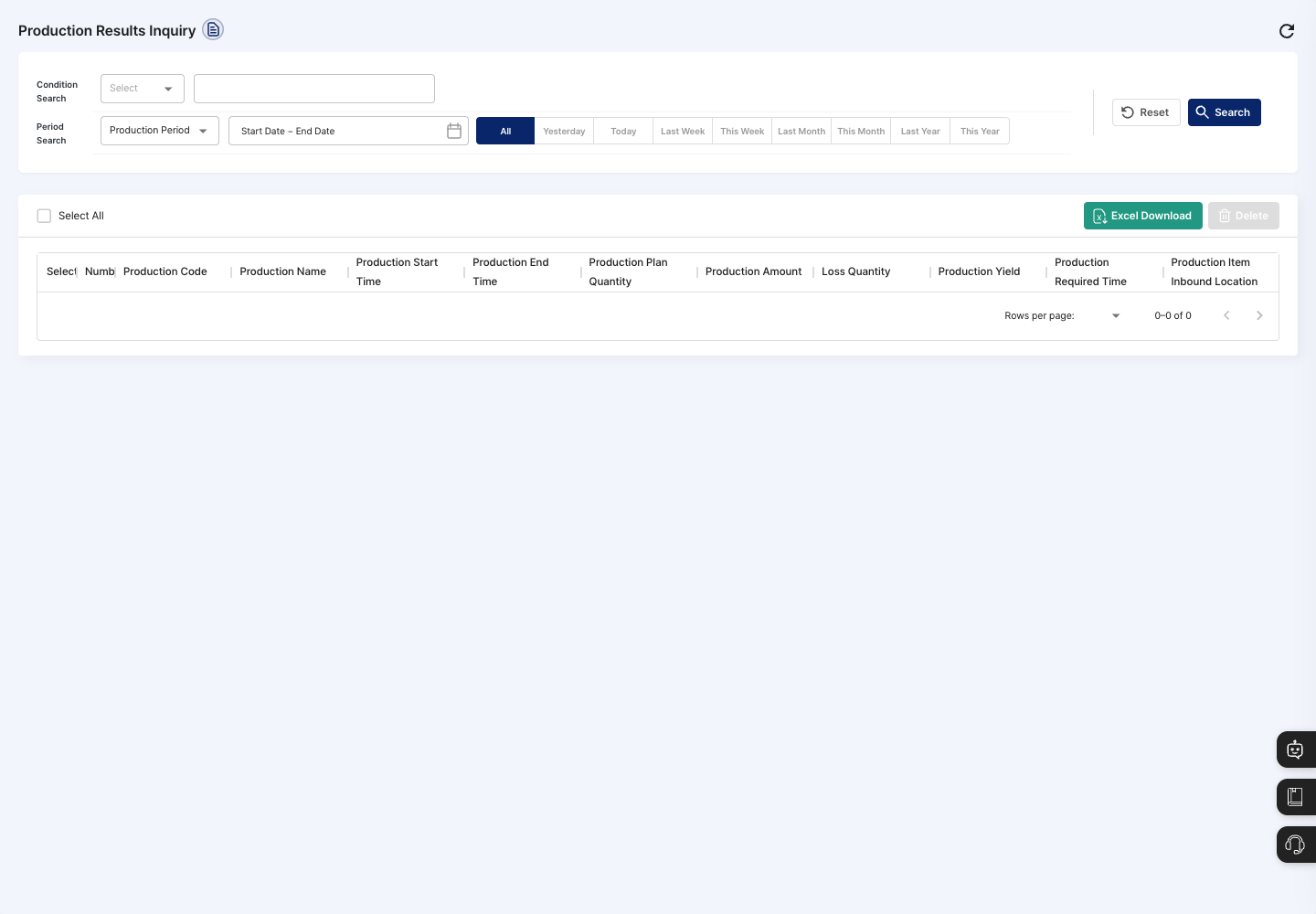
- Condition Search: Choose production code or production name and enter a search term.
- Period Search: Pick the
Production Period(based on the date production ended) in the calendar, or set it quickly with the All, Yesterday, Today, Last Week, This Week, Last Month, This Month, Last Year, and This Year buttons. All is selected at first. - Reset / Search: Clear the conditions, or search with the conditions you entered.
- List: Shows the production code, production name, production start time, production end time, production plan quantity, production quantity, loss quantity, production yield, production required time, and production item inbound location. Click the arrow in front of a production name to expand the detailed results of that record below it.
- Excel Download: If rows are selected, downloads only the selected rows. If none are selected, downloads all results that match the current conditions as a file.
- Delete: Deletes the selected results.
Query production results
- In Condition Search, choose Production Code or Production Name and enter a search term.
- In Period Search, set the production period.
- Click Search.
- In the list, compare the planned quantity with the production quantity, loss quantity, and production yield.
- Click the arrow in front of the production name of the result you want to see in detail.
- In the expanded
Production Summary Result Indicator, checkProduction Achievement Rate,Final Output Rate,Product Loss Rate, andRequired Time Achievement Rate. InProduction Process Performance, check the equipment, item, planned quantity, loss quantity, person in charge, and excess required time for each process.
Delete production results
- In the list, select the checkbox of each result you want to delete. To select everything on the current page, click Select All.
- Click Delete.
- In the dialog asking whether you are sure you want to delete, click Delete.
- When a message says the deletion is complete, the list is refreshed.
FAQ
Q. The list is empty. Check whether there are productions processed through work completion in that period. Change the period to All and search again.
Q. I see No data to download.
No results match the current conditions. Widen the search conditions or the period, then download again.
Q. The numbers in the expanded details are different from what I expected. In Work Completion, check that the completion date and production quantity of that record are correct. Then click Reset or search again to see the latest results.
Q. Can I edit results here? No. You can only delete results on this screen. Results must be edited in Work Completion, where the original record was entered.
Related menus
- Work Completion — Process the production results shown on this screen.
- Production Plan Management — Set planned production quantities.
- Production by Item/Partner — View results grouped by item and partner.
- Warehouse Registration — Manage the locations where produced items are received.