Production by Item/Partner
This screen gathers how much of each item you produced and for which partner. Choose a period and currency to compare production result amounts by item and by partner in one table.
Screen layout
When you first open the screen, results are loaded automatically by process date from the first to the last day of this month. You can see the results right away without entering anything.
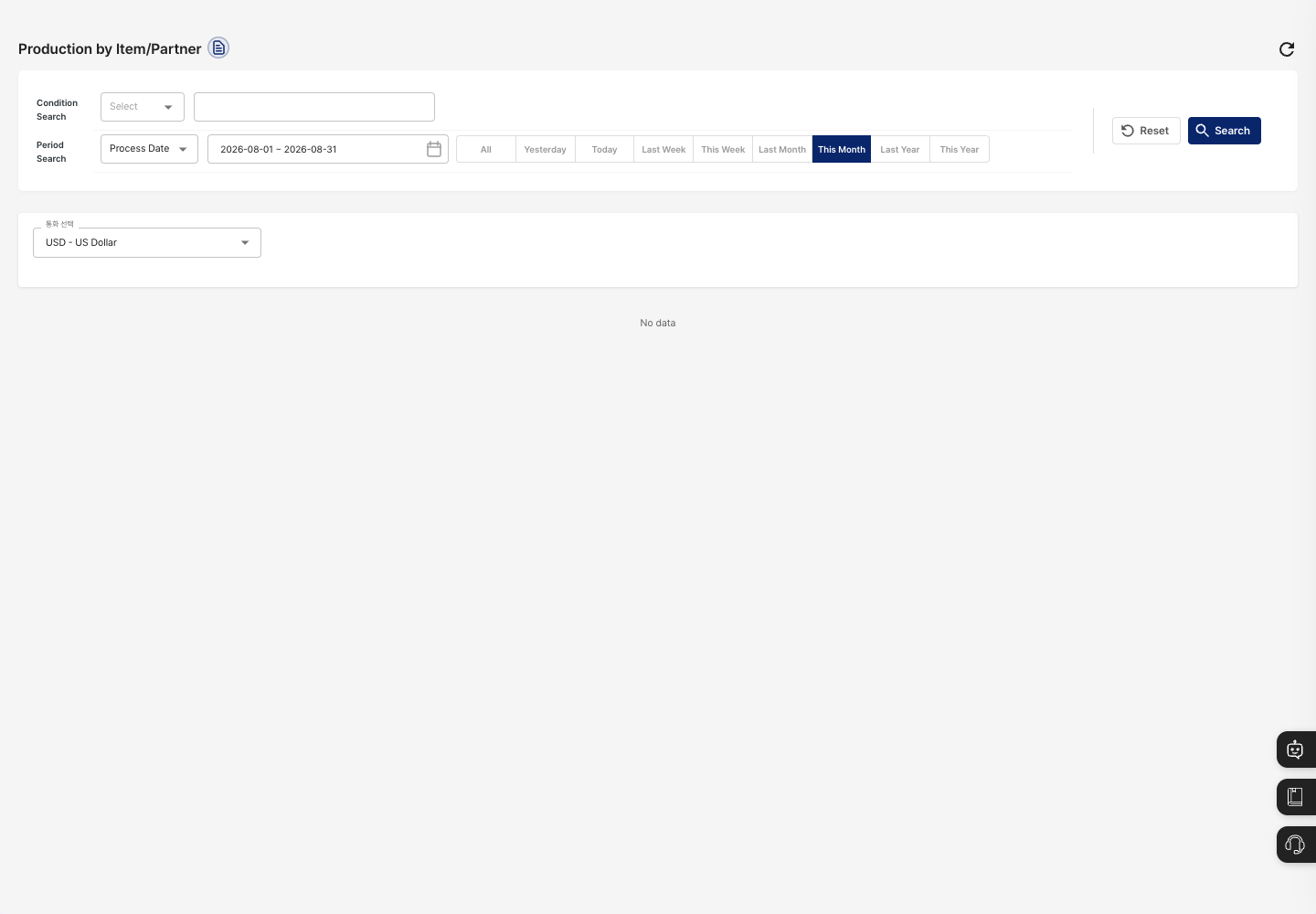
- Condition Search: Choose
Item NameorItem Codeand enter a search term. - Period Search: Set the period by
Process Date. Pick dates in the calendar, or use the All, Yesterday, Today, Last Week, This Week, Last Month, This Month, Last Year, and This Year buttons for a quick selection. This Month is selected at first. - Reset / Search: Clear the conditions and search this month's results again, or search with the conditions you entered.
- Select Currency: Choose the currency for displaying amounts. At first, the currency that matches your currency settings is selected. If there is no setting,
USDis selected. - Results area: Result amounts are shown in a table with items as rows and partners as columns. The table has
Item Name,Item Code, an amount column for each partner, and aTotalcolumn. TheTotalrow at the bottom shows the total for each partner and the grand total. If there are no results,No datais shown.
Query production results
- To see only specific items, choose
Item NameorItem Codein Condition Search and enter a search term. - In Period Search, set the process date period.
- Click Search, or press Enter in the search term box.
- In Select Currency, check or change the currency for amounts.
- In the results table, review the amounts and totals by item and by partner.
FAQ
Q. I see No data.
Check whether there are completed work results in the selected process date period. Widen the period to All and search again.
Q. The amounts are different from what I expected. Check the currency chosen in Select Currency. Each currency has its own exchange rate, so the amounts differ. You can see the applied exchange rates on the Exchange Rates screen.
Q. Can I download the results to Excel? No. This screen has no Excel download. Check the results in the table on the screen.
Q. Can I edit results here? No. This screen is view-only. Results reflect what was processed in Work Completion.
Related menus
- Work Completion — Process the work completion that creates the results on this screen.
- Production Results Inquiry — View results for each production.
- Currency Settings — Set the currencies used to display amounts.
- Exchange Rates — Check the exchange rates currently applied.