Partner Registration
This screen registers and manages partner information, such as suppliers you buy materials from, customers you sell products to, and subcontractors. Partners registered here can be selected in many tasks, including items, orders, and in/out, and you can also upload a business license file and let the AI fill in the information.
Screen layout
The first partner screen lists the registered partners. Set conditions and a period in the search area at the top to find the partner you want.
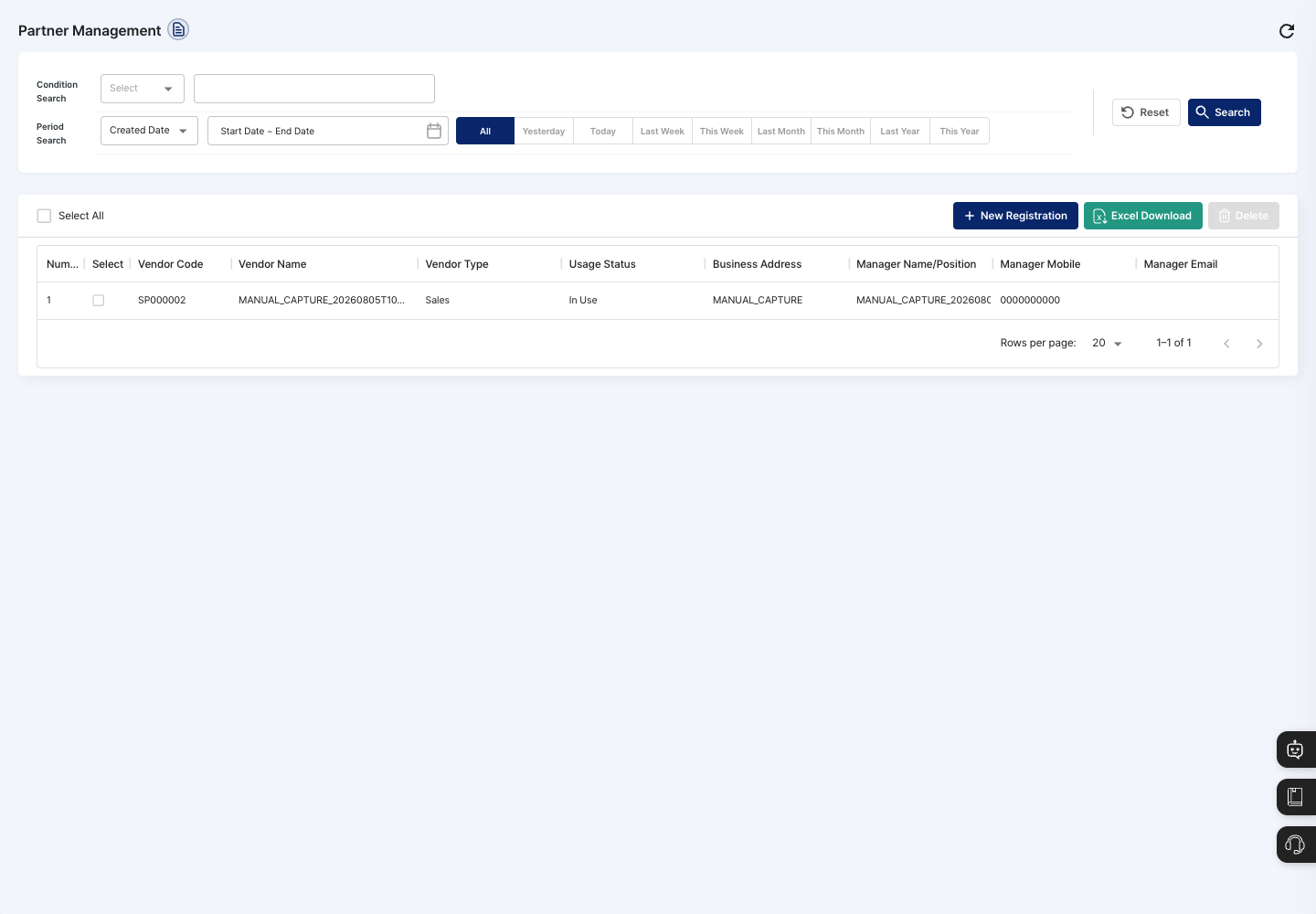
- Condition Search / Period Search: Set a search condition (vendor code, vendor name, vendor type, business address, manager name/position, manager mobile, or manager email) and a created date or modified date period, then click Search. Click Reset to clear the conditions.
- List: Check the vendor code, vendor name, vendor type, usage status, business address, manager name/position, manager mobile, and manager email. Click a row to open the detail screen.
- Select All: Checks or unchecks all partners on the current page at once.
- New Registration: Registers a new partner. The registration screen has two tabs: AI Auto Registration and Manual Registration.
- Excel Download: Downloads the partner list as a file.
- Delete: Deletes the partners checked in the list.
Register a partner
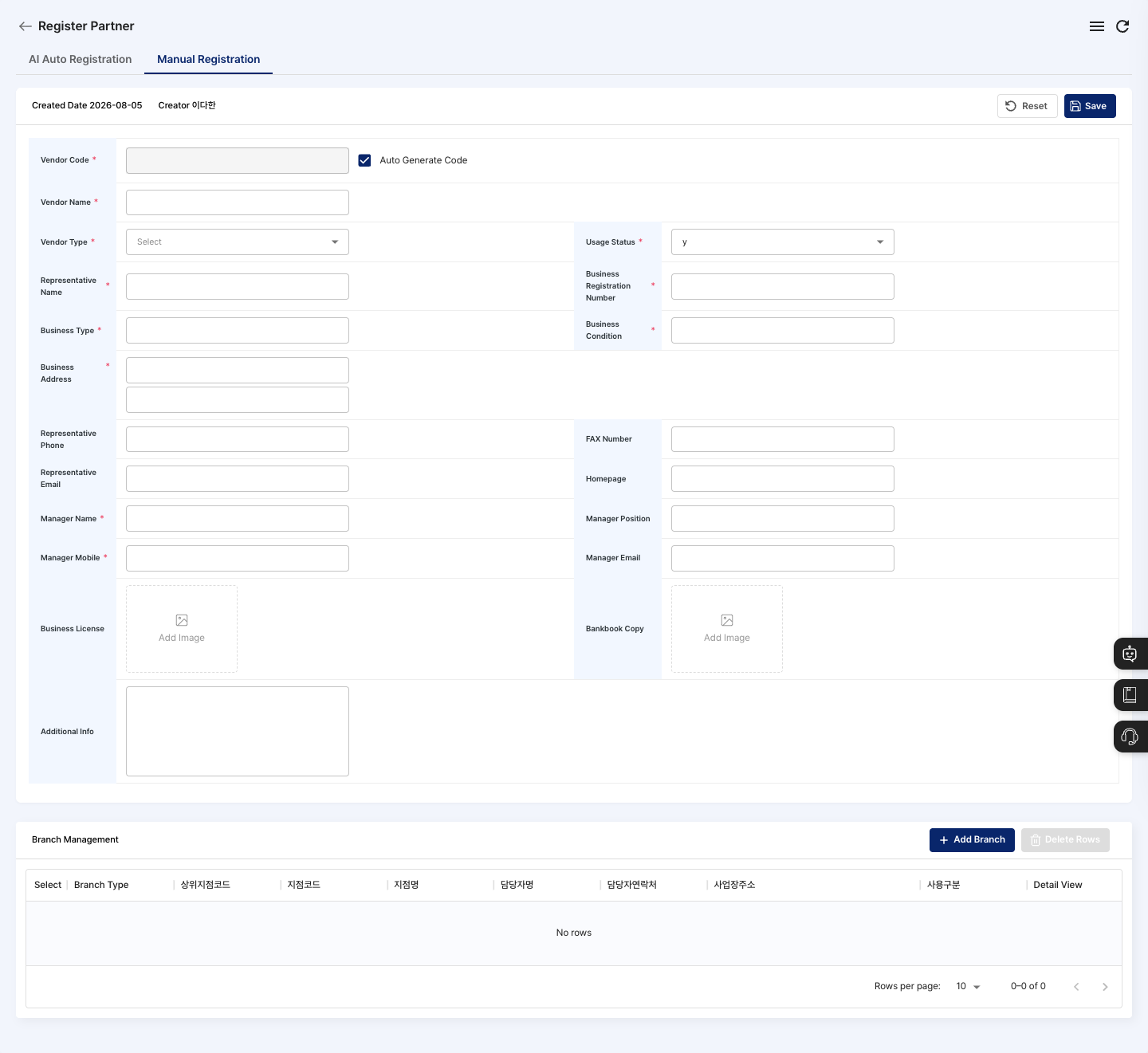
The steps below are based on the Manual Registration tab of the registration screen. When you open the registration screen, the Manual Registration tab is selected first. To fill in the information from a business license, see "Fill in with AI auto registration" below.
- On the list screen, click New Registration.
- Check that the Manual Registration tab is selected.
- Check the vendor code. Auto Generate Code is checked at first, so the code is filled in automatically when you choose the Vendor Type. To enter it yourself, uncheck it.
- Enter the Vendor Name, and choose the Vendor Type (
Sales,Purchase,Sales/Purchase,Outsourcing,Others) and Usage Status. - Enter the Representative Name, Business Registration Number, Business Type, and Business Condition.
- Enter the Business Address yourself, or find and insert it with the Korean address search button, then enter the detailed address in the field below. The Korean address search button appears only on the Korean screen.
- Enter the Manager Name and Manager Mobile.
- If needed, enter the representative phone, FAX number, representative email, homepage, manager position and email, business license and bankbook copy images, and additional info.
- If the partner has branches, click Add Branch in Branch Management below to add branch information. To remove a branch added by mistake, check it and click Delete Rows.
- Click Save, then confirm in the
Do you want to register?dialog. - When you see the registration complete message, you return to the list. Check on the list and detail screens that the vendor type and usage status are shown as intended.
Fill in with AI auto registration
When you upload a business license file, the AI reads the partner information and fills in the registration form for you.
- On the registration screen, click the AI Auto Registration tab.
- Drag a file onto the Business License area, or click the area to choose a file. You can upload PDF, JPG, or PNG files up to 10 MB.
- To use a different file, click Reattach. To remove it, click Reset.
- Click Auto Generate Info. You can click it only after uploading a file.
- When
AI auto generation completedis shown, the information read from the file is filled into the registration form below. The uploaded file is also linked as the business license image. - Check each filled value, and fill in any required items that are still empty.
- Click Save, then confirm in the
Do you want to register?dialog.
View details and edit
- Click a partner in the list to open its detail screen.
- Click Edit.
- Correct the changed information and branches, click Save, and confirm in the
Do you want to save changes?dialog. You cannot change the vendor code. - When you see the edit complete message, you return to the list.
Delete a partner
- In the list, check the partner to delete. You can also delete it with the Delete button on the detail screen.
- Click Delete.
- Approve the deletion in the
Are you sure you want to delete?confirmation dialog.
FAQ
Q. I click Save, but the partner is not registered.
Check the message in the dialog (for example, Please enter the business type.). The business type, business condition, business address, manager name, and manager mobile are especially easy to miss. It is also not saved if the business type is longer than 50 characters.
Q. Do I have to set the vendor code myself? No. Auto Generate Code is checked by default, so the code is filled in automatically when you choose the vendor type.
Q. A partner cannot be deleted.
If An error occurred during deletion. is shown, first check whether any orders or in/out records use this partner.
Q. The file does not upload in AI auto registration. You can upload only PDF, JPG, or PNG files up to 10 MB. For other formats or larger files, a message is shown.
Related menus
- New Item Registration — Link partners to items.
- Order Management — Register orders received from customers.
- Production by Item/Partner — Check production results by partner.