Inspection Standard Management
Use this screen to decide in advance what to check in a quality inspection, against which standard, by which method, and how often. When you link inspection standards to process standards, inspectors can all inspect against the same standard.
Screen layout
The first screen of Inspection Standard Management lists the registered inspection standards.
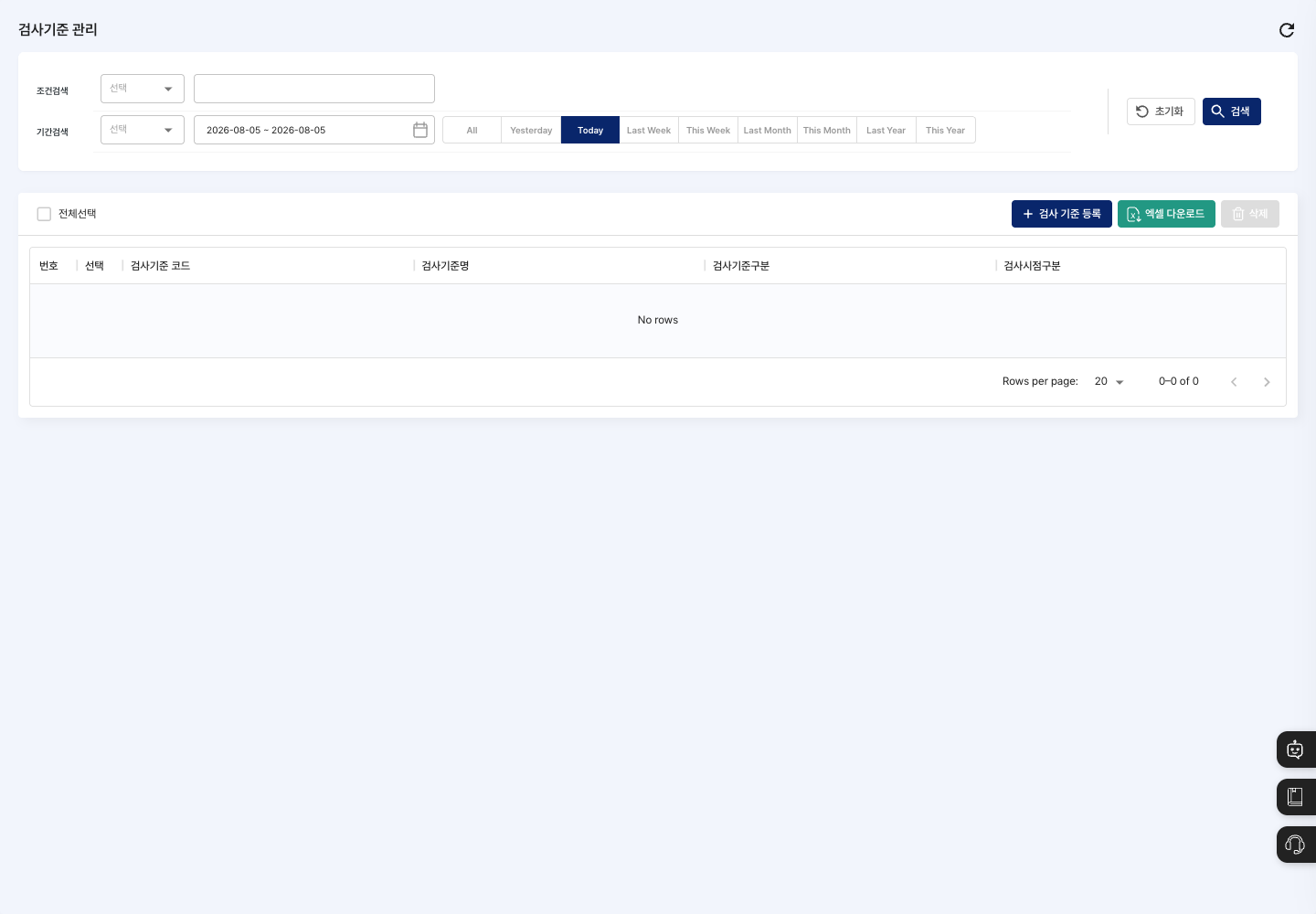
- Condition Search / Period Search: Set a field, keyword, and period to find inspection standards. To search by period, first choose the date basis (
Created DateorModified Date), then set the start and end dates or use theYesterday,Today,Last Week,This Week,Last Month,This Month,Last Year, andThis Yearbuttons to pick a period quickly. - List: Shows the inspection standard code, inspection standard name, inspection standard type, and inspection timing type.
- Inspection Standard Registration: Create a new inspection standard.
- Excel Download: Download all inspection standards as an Excel file, regardless of the search conditions.
- Delete: Delete the selected inspection standards.
Register an inspection standard
- On the list screen, click Inspection Standard Registration.
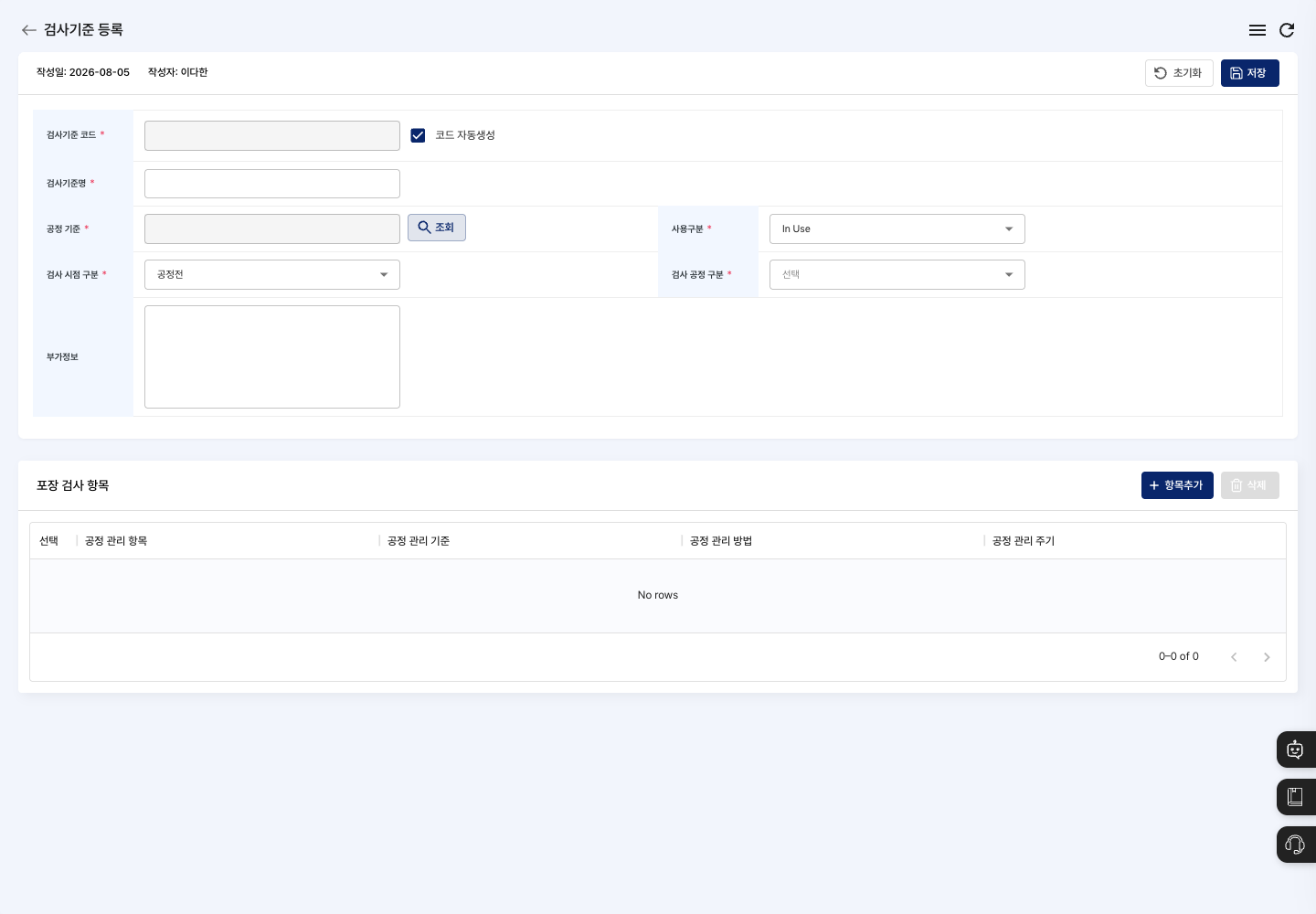
- Set the Inspection Standard Code. Auto Generate Code is checked by default, so the code is filled in automatically. To enter it yourself, uncheck it and type the code.
- Enter the Inspection Standard Name.
- Click Search next to Process Standard and choose the process standard to link in the
Process Standard Searchwindow. - Select the Usage Status, Inspection Timing Type, and Inspection Process Type. During registration, you can choose only
Before Processfor Inspection Timing Type. - If needed, leave a note in Additional Info.
- In the
Packaging Inspection Itemsarea at the bottom, click Add Item. In theAdd Processwindow, fill in all of Process Management Items, Process Management Standards, Process Management Methods, and Process Management Cycle, then click Add. To remove an item added by mistake, select it and click Delete on the right side of the area. - Click Save at the top. Click Confirm in the
Registration completed.window to return to the list.
View details and edit
- Click the inspection standard you want to change in the list to open the
Inspection Standard Detailsscreen. You can only view the basic information and inspection items here. - Click Edit.
- Change the details on the
Edit Inspection Standardscreen. You can also change inspection items with Add Item and Delete, and you can chooseBefore ProcessorAfter Processfor Inspection Timing Type. - Click Save, then click Confirm in the
Do you want to save changes?window. After saving, you return to the list. To leave without saving, click List.
Delete an inspection standard
- In the list, check the Select box of the inspection standard you want to delete.
- Click Delete, then click Delete in the
Are you sure you want to delete?window.
FAQ
Q. I clicked Save, but it did not save and only a message appeared. Check whether the required field the message points to is empty. In particular, the standard does not save if you did not add any inspection items.
Q. The process I want is not in the process standard search. First check that the process standard is registered in Process Standard Management.
Q. I clicked Add in the Add Item window, but the item was not added.
The item is added only when all four fields in the Add Process window (process management item, standard, method, and cycle) are filled in. If a message points to an empty field, fill it in.
Q. The Inspection Standard Code field is grayed out. This is because Auto Generate Code is checked. To set the code yourself, uncheck it and enter the code.
Related menus
- Process Standard Management — Register the process standards to link inspection standards to first.
- Quality Inspection Status — Check quality inspection records and issues by process.
- Defect Status — Check the defects that occurred during production.