Production Availability Analysis
This screen calculates which products you can make, and how many, with the material stock you have now, and shows which materials are short. It is useful to check before you create a production plan or order materials.
Screen layout
When you first open the screen, the Product Standard tab is shown. You can see the results right away without entering anything, and there is no search condition for choosing a period.
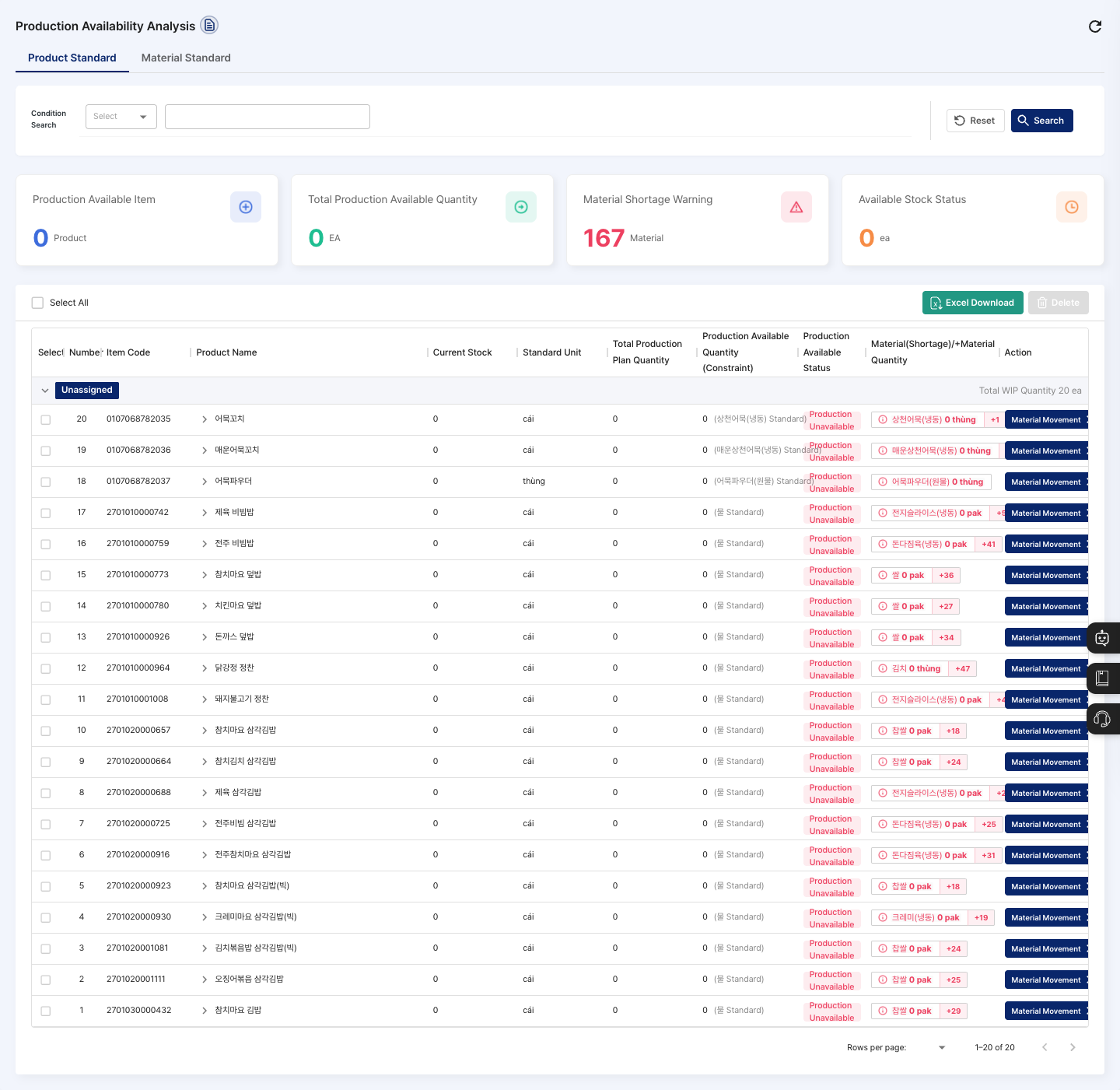
- Product Standard / Material Standard tabs: Choose whether to view from the product side or the material side. Each tab uses different query criteria and indicators.
- Condition Search: On the Product Standard tab, search by
Production Name(product name),Item Code, orItem Category. On the Material Standard tab, search byItem Name,Item Code, orItem Type. You chooseItem CategoryandItem Typefrom a list. - Summary cards: The Product Standard tab shows
Production Available Item,Total Production Available Quantity,Material Shortage Warning, andAvailable Stock Statusas numbers. The Material Standard tab showsTotal Required Material Quantity,Available Material Stock Quantity,Shortage Material Quantity, andTotal Material Availability Rate (%). The Material Standard tab also shows theMaterial Requirement and Stock StatusandShortage Materialcharts. - List (Product Standard tab): Items are grouped by item category (
Unassignedif there is no category). The list shows the item code, product name, current stock, standard unit, total production plan quantity, producible product quantity, production available status (Production Available/Partially Available/Production Unavailable), and short materials and material count. - List (Material Standard tab): For each material, the list shows the item code, item name, material type, current stock, planned quantity, shortage quantity, standard unit, stock availability rate against the plan, and producible quantity based on current stock.
- Action column: Each row has a Production Plan Movement or Material Movement button that takes you straight to the screen you need.
- Excel Download: Downloads the list on the page you are viewing as a file. If there is no data to download,
No data to download.is shown.
Query producible quantities
- Choose the Product Standard or Material Standard tab.
- If needed, choose a search item in Condition Search and enter a search term, or pick a value from the list.
- Click Search. To clear the conditions, click Reset.
- Check the overall picture in the summary cards, then check
Production Available Quantity (Constraint)andProduction Available Statusfor each item in the list. - For rows with short materials, check the short materials and shortage quantities in the material column. Click the material column to open the
Material Detailwindow, where Material Movement Page opens the receiving screen. - Click a row to expand it and see the required quantity, current stock, and shortage/remaining quantity for each process. In the expanded details, click Material Inbound Instruction to open the material in/out screen in a new tab.
Check by material
- Click the Material Standard tab.
- In the summary cards and charts, check the required material quantity, available stock, and material shortage status.
- In the list, check the
Shortage QuantityandPlan Comparison Stock Availability Rate (%)for each material. Materials without a plan are shown asNo Plan. - Click a row to see, for each production plan that uses the material, the shipment due date, available quantity, production available status, and shortage impact.
- For short materials, click Material Movement to process their receipt.
FAQ
Q. The producible quantity shows 0. The stock of the materials linked to the product is short or empty. Check the short materials in the material column of the list and process their receipt first.
Q. A product does not appear in the list. Check that the product is registered in New Item Registration and that its material structure exists in BOM Registration.
Q. Nothing happens when I click the Delete button above the list. This screen is view-only, so clicking Delete does not delete any data. Manage production plans in Production Plan Management.
Q. Can I register a production plan right here? No. This screen is mainly for viewing. Click Production Plan Movement and register it in Production Plan Management. Work results are processed in Work Completion.
Related menus
- BOM Registration — Set the materials and required quantities for each product.
- Production Plan Management — Create production plans for products that can be produced.
- Material In/Out by Material — Receive short materials.
- Work Completion — Process production results.