Exchange Rates
This screen shows the exchange rates currently applied to each currency and their effective date. When other screens show amounts in several currencies, you can check here which exchange rate was used.
Screen layout
When you open the screen, the currently applied exchange rates are loaded automatically. There are no search conditions. The screen title is shown as Exchange Rate Information.
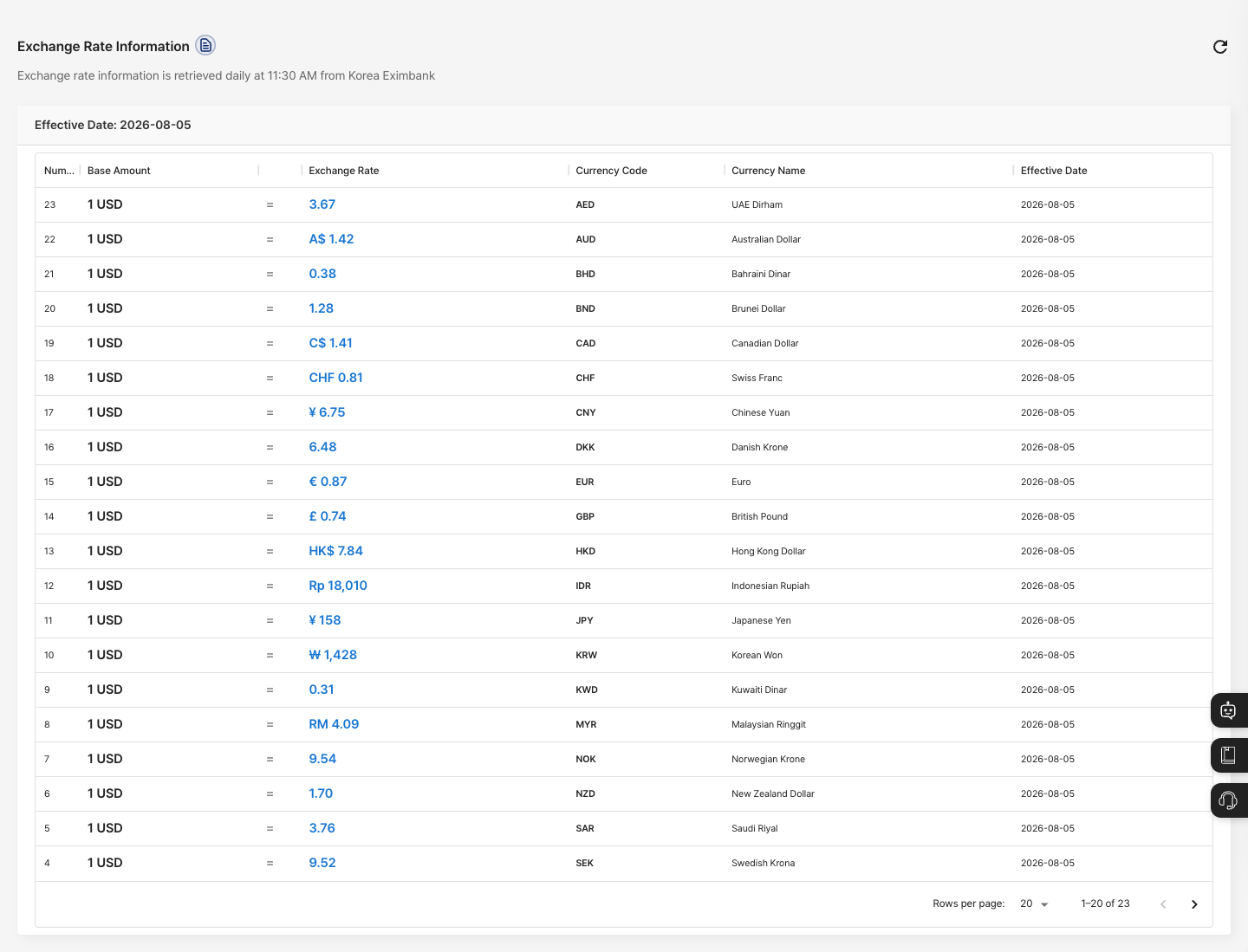
- Notice: Below the title,
Exchange rate information is retrieved daily at 11:30 AM from Korea Eximbankis shown. - Effective Date: The date the current exchange rates took effect is shown above the list.
- List: Shows the number, base amount (for example,
1 USD), exchange rate (shown with the currency symbol), currency code, currency name, and effective date. - Pages: The list shows 20 records per page by default. At the bottom, you can move between pages or change the number of records per page (5, 10, 20, or 25).
Check exchange rates
- In the left menu, click Dashboard → Exchange Rate Information.
- Check the Effective Date above the list.
- Check the exchange rate of the target currency for one unit of the base currency.
- If you cannot see the currency you want, go to the next page at the bottom.
FAQ
Q. The effective date is not today. The screen shows the effective date of the exchange rates currently in use. Exchange rate information is retrieved again every day at 11:30 AM. If the effective date keeps being different from what you expect, ask your company administrator.
Q. The currency I want is not in the list. Go to the next page at the bottom, or increase the number of records per page.
Q. Can I enter exchange rates myself? No. You cannot save or edit exchange rates on this screen. The exchange rates are values retrieved automatically every day from Korea Eximbank.
Related menus
- Currency Settings — Set the currencies you use.
- Production by Item/Partner — View production result amounts in the selected currency.