Unified In/Out History Management
Use this screen to gather inbound and outbound records created by different tasks, such as material receiving and work orders, and look them up by date and item. Use it when you want to check at once "when, why, and how much of this material came in and went out."
Screen layout
The top is the search area, and the bottom is the in/out history list.
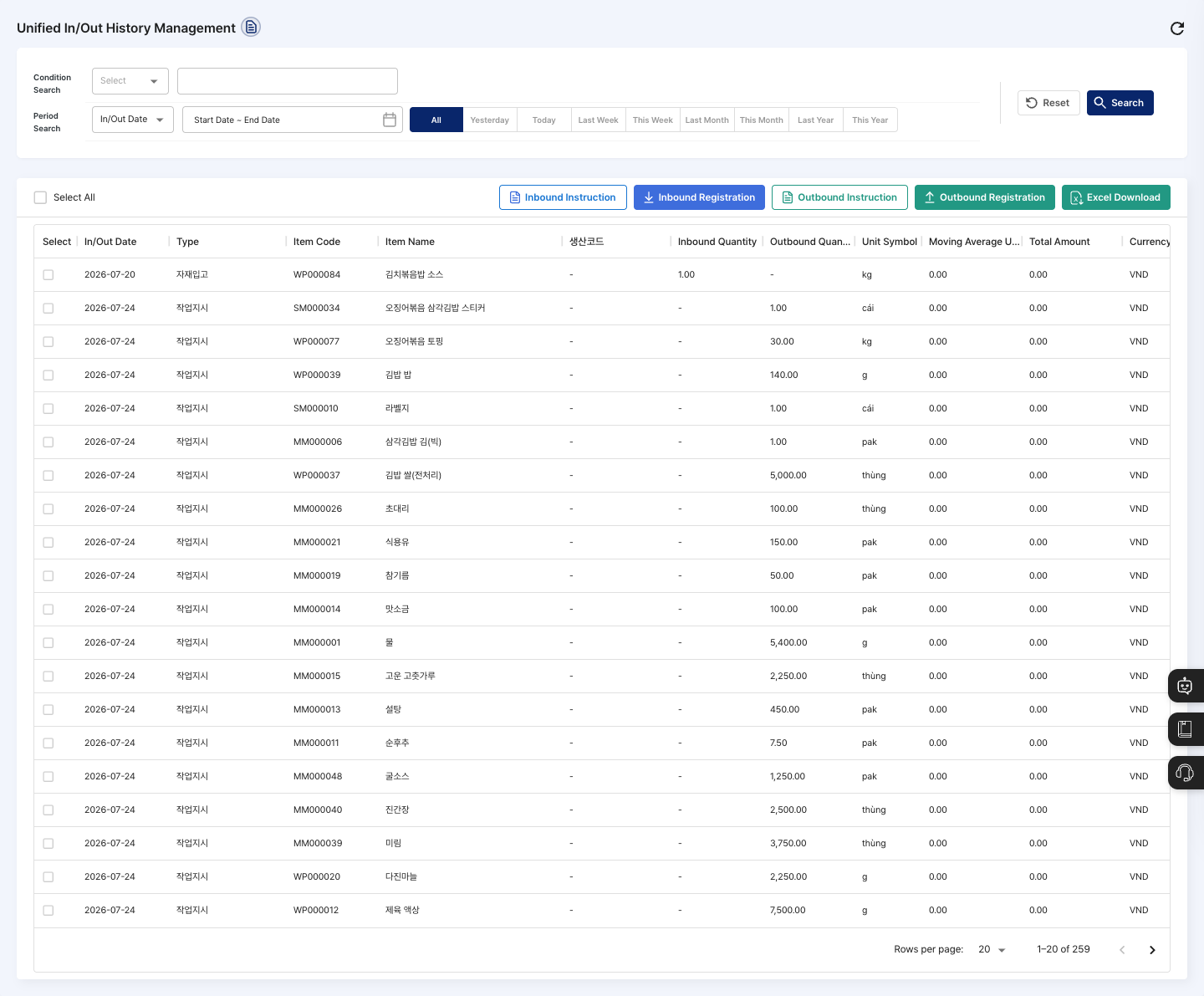
- Condition Search / Period Search: Set a search basis and period, then click Search. After changing the conditions, you must click Search for them to be applied to the list. Click Reset to return the conditions to their defaults.
- List: Check the in/out date, type, item code, item name, production code, inbound quantity, outbound quantity, unit symbol, moving average unit price, total amount, currency code, status, processing status, storage code, and storage name. Type shows the task that created the record, such as
Work Order,Inventory Adjustment, orInitial Registration. Click a row to open that material's detail screen in Material In/Out by Material. - Inbound Instruction / Inbound Registration / Outbound Instruction / Outbound Registration: Start each in/out task directly from this screen. When you click a button, first choose the target material in the
Item Searchwindow. - Excel Download: Download all history that matches the conditions currently applied as a file.
Search in/out history
- In Condition Search, choose a search basis from Item Code, Item Name, Production Code, or Storage Name, and enter a keyword. If you choose Storage Name, click Storage Search to select a warehouse.
- In Period Search, choose
In/Out Dateand set the start and end dates. Or click one ofAll,Yesterday,Today,Last Week,This Week,1 Week,Last Month,This Month,1 Month,Last Year, orThis Year. - Click Search.
- In the list, check the inbound quantity, outbound quantity, and amount of the item you want.
Process waiting records and view history details
- For records in the
Pending InboundorPending Outboundstatus, click Proceed Inbound or Proceed Outbound in the Processing Status column to process them. - To see the details of one history record, click the icon in the Detail View column. The
Material Inbound DetailorMaterial Outbound Detailwindow opens. - For records whose type is
Material Inbound,Inbound Correction,Material Outbound, orOutbound Correction, click Edit in the detail window to correct the quantity and remarks (and the inbound unit price for inbound), then click Save. The changes are recorded in the modification history.
Download to Excel
- First search with the conditions you want.
- Check that the number of records and the applied conditions are correct.
- Click Excel Download.
FAQ
Q. Can I correct or delete history on this screen?
You cannot delete it. You can correct only records whose type is Material Inbound, Inbound Correction, Material Outbound, or Outbound Correction, using Edit in the Detail View window. For other records, check the Type in the list, then look at them on the original task screen that created the record.
Q. The record I am looking for is not in the list. Check that Period Search is not set too narrowly, click Reset, and search again.
Related menus
- Material In/Out by Material — Check stock by material and register inbound and outbound.
- Warehouse Registration — Manage the warehouses that store materials.
- Material in/out list — Process inbound and outbound on the shop-floor tablet.